
Before you follow the route
Use the live HUD and the visible result after each step before moving to the next one.
- 01
Which live Farm state matches your screen?
- 02
Finish the visible Farm state
Do this
Farm progress uses the live Farm area name, Wave value, percentage, objective, bag, arrows, and vents. Farm can have a second wave, and Farm 100.0% confirms only the Farm area itself.
You should see
The percentage changes, a wave clears, or Farm reaches its completion state.
If it differs
Sell if the bag is full; do not follow fixed video coordinates or buy a claimed fix.
- 03
Check the remaining outer-area chain
Do this
After Farm reaches 100.0%, Basement can unlock immediately or after remaining neighboring-area progress. Farm 100.0% alone does not show that the whole outer chain is done.
You should see
The reliable next signal is Unlocked: Basement plus an objective change.
If it differs
Do not repeatedly reclear a completed Farm or invent a hidden trigger.
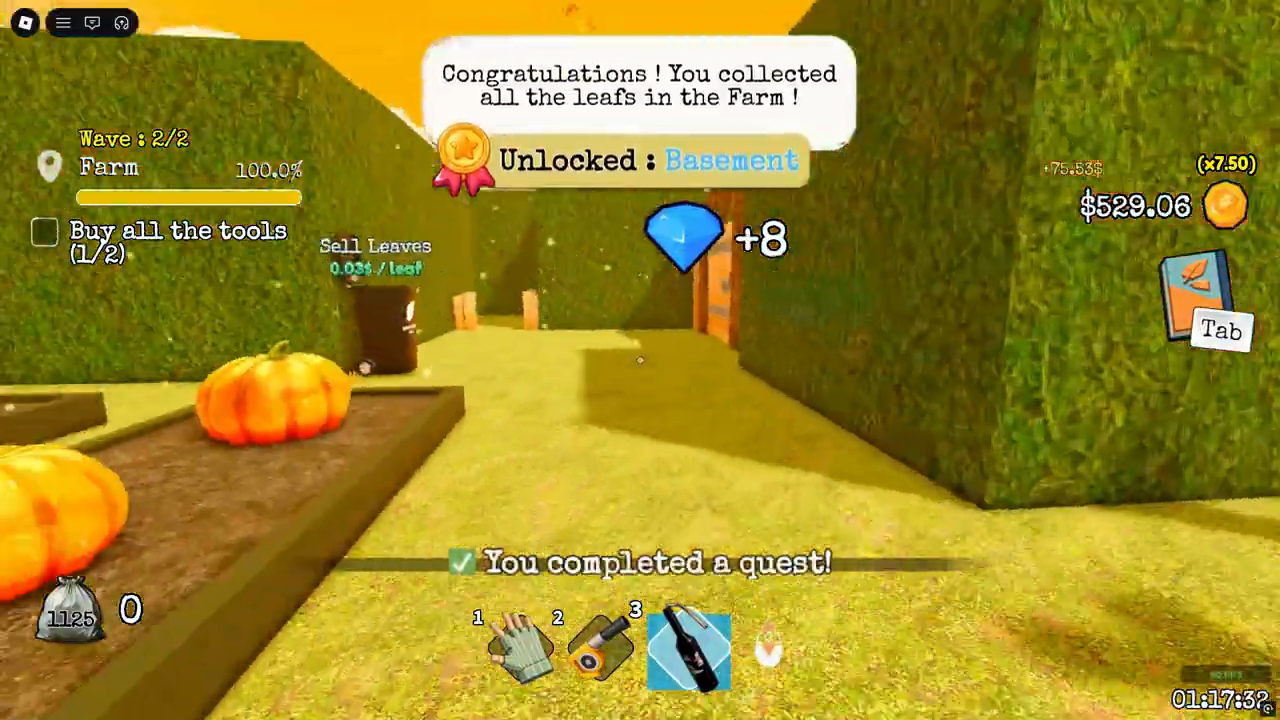
Use the exact Unlocked: Basement popup and an objective change as the stronger transition signal, not Farm 100% alone.
Source: MilkyBlox - 04
Stop repeating the same attempts
Do this
Only if you accept the round-progress risk above, try one new server and compare whether the area, wave, percentage, objective, bag, arrows, vents, or unlock message changes. Then stop blind retries.
You should see
You can tell whether the stuck state changed without spending more or repeatedly rejoining.
Watch the route
Jump to this part of the video.
Relevant section 26:06–32:05